03 Motion and Forces

Free-Body Diagrams in Two-Body Motion


Students are often confused about the forces in drawing free-body diagrams, especially so when they have to consider the different parts of multiple bodies in motion.

Two-Body Motion

Let’s consider the case of a two-body problem, where, a force F is applied to push two boxes horizontally. If we were to consider the free-body diagram of the two boxes as a single system, we only need to draw it like this.
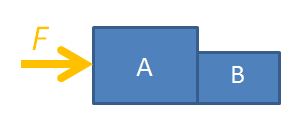
two-body
Considering both boxes as a single system

For the sake of problem solving, there is no need to draw the normal forces or weights since they cancel each other out, so the diagram can look neater. Applying Newton’s 2nd law of motion, $F=(m_A+m_B) \times a$, where $m_A$ is the mass of box A, $m_B$ is the mass of box B, F is the force applied on the system and a is the acceleration of both boxes.

You may also consider box A on its own.
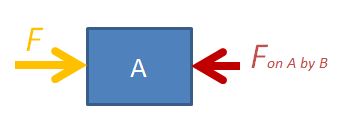
DYNAMICS2
Considering box A on its own

The equation is $F-F_{AB}=m_A \times a$, where $F_{AB}$ is the force exerted on box A by box B.

The third option is to consider box B on its own.
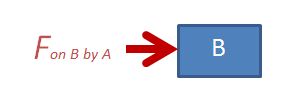
DYNAMICS3
Considering box B on its own

The equation is $F_{BA}=m_B \times a$, where $F_{BA}$ is the force exerted on box B by box A. Applying Newton’s 3rd law, $F_{BA}=F_{AB}$ in magnitude.

Never Draw Everything Together

NEVER draw the free-body diagram with all the forces and moving objects in the same diagram, like this:
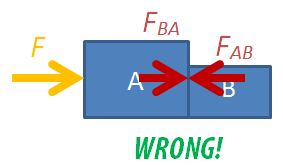
wrong freebody diagram

You will not be able to decide which forces acting on which body and much less be able to form a sensible equation of motion.

Interactive

Use the following app to observe the changes in the forces considered in the 3 different scenarios. You can vary the masses of the bodies or the external force applied.

Multiple-Body Problems

For the two-body problem above, we can consider 3 different free-body diagrams.

For three bodies in motion together, we can consider up to 6 different free-body diagrams: the 3 objects independently, 2 objects at a go, and all 3 together. Find the force between any two bodies by simplifying a 3-body diagram into 2 bodies. This trick can be applied to problems with even more bodies.

Two Body Problems in Dynamics

Problems involving two bodies moving together usually involve asking for the magnitude of the force between the two.

For example:

A 1.0 kg and a 2.0 kg box are touching each other. A 12 N horizontal force is applied to the 2.0 kg box in order to accelerate both boxes across the floor. Ignoring friction, determine:

(a) the acceleration of the boxes, and

(b) the force acting between the boxes.

To solve for (b) requires an understanding that the free-body diagram of the 1.0 kg box can be considered independently as only the force acting between the two boxes contributes to its acceleration since it is the only force acting on it in the horizontal direction.

This interactive app allows for students to visualise the forces acting on the boxes separately as well as a single system.

The codes for embedding into SLS:

<iframe scrolling="no" title="Two Mass Problem" src="https://www.geogebra.org/material/iframe/id/fh5pwc37/width/638/height/478/border/888888/sfsb/true/smb/false/stb/false/stbh/false/ai/false/asb/false/sri/false/rc/false/ld/false/sdz/false/ctl/false" width="638px" height="478px" style="border:0px;"> </iframe>

Measuring Difference in Drop Time Using PhyPhox

In a recent class on Kinematics, I prepared a string of 4 pendulum balls, each separated about 20 cm apart and dropped them from a height. Before that, I got students to predict whether the intervals in time between drops will be constant, increasing or decreasing.

Most students are able to predict rightly that the intervals will be decreasing and explain their reasoning.

What challenged me was this: previously, we had to listen to the intervals of sound to verify the answer. I had tried using laptop software such as Audacity to record the sound before. However, I wanted students to be involved in this verification process. PhyPhox enabled that.

With each student being able to download the mobile app into their phones, all I needed to do was to ensure everyone uses the correct setting: the Audio Scope setting and to change their range to the maximum duration (500 ms). They then had to be familiar with the play and pause button so they can stop the measurement in time to see the waveform.

I then did a countdown before dropping the balls. This is an example of the graph obtained.

Through this graph, you can see that:

  1. the time interval between drops decreases as the balls dropping over a larger height had gained more velocity by the time they reach the table.
  2. the amplitude of sound increases as the balls drop with increasing velocity, therefore hitting the table with larger force.

Relationship between displacement-time and velocity-time graphs

Through this GeoGebra app, students can observe how the gradient of the displacement-time graph gives the instantaneous velocity and how the area under the velocity-time graph gives the change in displacement.

In the GeoGebra app below, you will see a displacement-time graph on the left and its corresponding velocity-time graph on the right. These graphs will be referring to the same motion occuring in a straight line. Instructions

  1. Click “Play” and observe the values of displacement and velocity change in each graph over time.
  2. Note the relationship between the gradient in the displacement-time graph and the value of velocity.
  3. Note the relationship between the area under the velocity-time graph and the value of displacement.

Instantaneous vs Average Velocity

This GeoGebra app allows students to observe the difference between instantaneous and average velocity from a graphical perspective.

Geogebra App for Kinematics

As one of the first topics in A-level physics, kinematics introduces JC students to the variation of velocity and displacement with acceleration. Very often, they struggle with the graphical representations of the 3 variables.

This Geogebra app allows students to vary acceleration (keeping it to a linear function for simplicity) while observing changes to velocity and displacement. Students can also change the initial conditions of velocity and displacement.

The default setting shows an object being thrown upwards with downward gravitational acceleration of 10 m s-2.

The movement of the particle with time is shown on the left with a reference line showing the position on the displacement graph.

GeoGebra link: https://www.geogebra.org/m/qpxcs6vb