Technology

Misconception: Skydiver goes up when parachute opens

When a parachute opens, many people think the parachutist suddenly shoots upward. This is not what really happens. The parachutist is always moving downward, but the parachute causes a very sharp deceleration. The large canopy produces a big upward drag force that slows the fall dramatically.

When people see videos of parachutists opening their parachutes, the camera angle can create a powerful illusion that the parachutist suddenly shoots upward. What really happens is that the parachutist decelerates sharply while the camera, usually attached to another skydiver, continues falling at almost the same high speed.

From the perspective of the camera, the parachutist with the open parachute is no longer keeping pace in the fall. The camera-holder is still dropping rapidly, but the parachutist has slowed down. In the video, this relative motion makes it look like the parachutist has bounced upward, when in fact they are still moving downward—just not as quickly.

The physics of air resistance shows clearly why the velocity cannot turn upward. Air resistance always acts opposite to the velocity and its size depends on speed. Before and after the parachute opens, the parachutist’s velocity is downward, so the drag force must be upward. If the parachutist’s velocity really were upward, then the drag would have to point downward. In that case, the resultant force would also point downward, making the acceleration greater than gravity—something we never observe. Instead, the drag force remains upward, which proves the parachutist is still moving downward the whole time. The chute simply reduces that downward speed to a safe value.

For a simulation on how the forces and velocity change with time, refer to this GeoGebra app.
RC Circuit

Open in new tab đź”—

This is meant for the A-level topic of Circuits, for which students have to describe and represent the variation with time, of quantities like current, charge and potential difference, for a capacitor that is charging or discharging through a resistor, using equations of the form $x = x_0e^{-\frac{t}{\tau}}$ or $x = x_0(1 – e^{-\frac{t}{\tau}})$, where $\tau = RC$ is the time constant.

This GeoGebra interactive by Dave Nero is well-designed. It illustrates how the charge, voltage, and current in an RC circuit change over time. You can adjust the resistance, capacitance, and supply voltage using the sliders provided. The two circuit switches can be opened or closed by selecting the check boxes. A drop-down menu allows you to choose which quantity to display on the graph, and pressing the play button in the lower left corner starts the time-dependent plot.

When a capacitor is connected in series with a resistor, the changes in current, charge and potential difference follow an exponential pattern, controlled by the time constant $\tau = RC$.

During charging, the capacitor begins with no charge, so the battery’s full potential difference appears across the resistor, giving a maximum initial current. As charge accumulates on the plates, the potential difference across the capacitor rises. This reduces the potential difference across the resistor, causing the current to decrease. The charge on the capacitor and its potential difference both increase with time according to the equation $x = x_0 \left(1 – e^{-t/\tau}\right)$, approaching their maximum values asymptotically. Meanwhile, the current decreases exponentially with time, following $x = x_0 e^{-t/\tau}$.

During discharging, the capacitor starts with an initial charge and potential difference. Once connected across the resistor, this stored energy drives a current in the circuit. As the charge leaves the plates, the potential difference across the capacitor falls. Both charge and potential difference decrease exponentially with time according to $x = x_0 e^{-t/\tau}$, and the current also decays exponentially to zero, reversing direction compared to charging.

The time constant $\tau = RC$ sets the rate of change. After one time constant, a charging capacitor reaches about 63% of its final charge, or a discharging capacitor falls to about 37% of its initial charge. After about five time constants, the process is practically complete.

Bouncing ball with energy loss

Open in new tab đź”—

This simulation offers a clear and interactive way to explore the motion of a ball bouncing on the ground, highlighting how displacement, velocity, and acceleration change over time. On the left, you’ll see the animation of the ball with vectors showing its position (green), velocity (pink), and acceleration (blue). The sliders at the top allow you to adjust the starting height, the percentage of energy lost on each bounce, and whether air resistance is included. You can pause, reset, or let the motion run continuously, while the time slider doubles as a scrubber when the simulation is paused.

On the right, the three graphs display how each physical quantity varies with time. The position–time graph shows the ball’s vertical displacement, always measured relative to the lowest point of its center of mass. The velocity–time graph alternates between negative and positive values, reflecting the downward and upward motion during each bounce, while the acceleration–time graph remains mostly constant at –g, with spikes at the moment of collision. Together, the animation and graphs help link the visual motion with the quantitative data, reinforcing the relationships between these variables.

The underlying theory follows Newton’s laws of motion. The ball accelerates downwards under gravity until it collides with the ground, where it loses some energy depending on the restitution factor. This is why the bounce height diminishes over time. The velocity vector shows not only the speed but also the direction of motion, while the acceleration vector indicates that gravity always acts downward, regardless of whether the ball is rising or falling. By adjusting energy loss during each collision and air resistance, you can model more realistic scenarios and see how dissipative forces affect motion, making this a powerful tool to visualize the physics of bouncing objects.

3D view of forces on parallel currents using GeoGebra

Open in new tab đź”—

The simulation serves to show how the magnetic field of one current-carrying wire exerts a force on another current-carrying wire.

When two wires are placed parallel to each other and carry electric currents, each wire produces its own magnetic field. The magnetic field around a straight current-carrying conductor forms concentric circles, and the direction of these circles can be determined by the right-hand grip rule: if you point your thumb along the direction of the current, your curled fingers show the direction of the magnetic field lines.

Because of this, one wire is always sitting inside the magnetic field created by the other. The moving charges in the second wire—that is, the current—interact with this magnetic field and experience a force. The strength of the force depends on the current in both wires and the distance between them, while the direction of the force can be worked out using Fleming’s left-hand rule or simply by considering how the two fields interact.

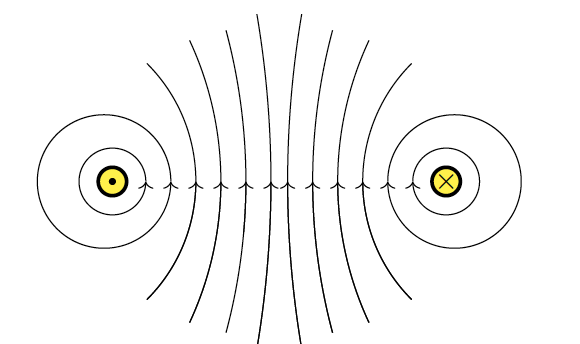
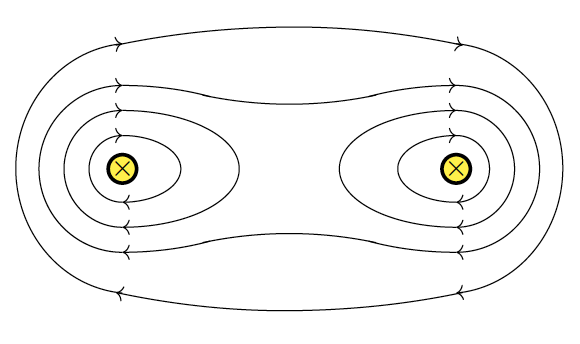
Magnetic field patterns between two parallel currents interact in such a way as to form either an attraction (for currents in same direction) or a repulsion (for opposite currents)

If the currents in the two wires flow in the same direction, the magnetic fields between the wires reinforce each other, producing a stronger field outside the pair and a weaker field between them. This imbalance pulls the wires towards each other, so they attract. On the other hand, if the currents run in opposite directions, the magnetic fields between the wires reinforce instead, while the fields outside are weakened. The result is a pushing apart of the two wires, so they repel each other.

In short, the force on parallel wires arises because each wire generates a magnetic field that acts on the current in the other. Identifying the force is straightforward once you know the directions of the currents: currents in the same direction cause attraction, while currents in opposite directions cause repulsion.

Displacement-distance graph and displacement-time graph of a wave

Open in new tab đź”—

Click here for full view.

Exploring Wave Properties Through Interactive Simulations

One of the most powerful ways to learn about waves is not just by reading definitions, but by seeing them in action. This simulation allows you to adjust amplitude, frequency, wavelength, and speed and watch how the wave’s behavior changes over time and space.

By the end of this activity, you should be able to:

  1. Define and use the terms speed, frequency, wavelength, period, and amplitude, and connect them to what you see on the graphs.
  2. Recall and apply the relationship $v = f \lambda$ to new situations and solve related problems.

How to Interact With the Simulation

Two Graphs, Two Perspectives

  • The top graph (Displacement vs Distance) shows the shape of the wave along space at a single instant.
  • The bottom graph (Displacement vs Time) shows how a single particle moves up and down as time passes.

Controls

  • Use the sliders to change Amplitude, Frequency, Wave Speed, and Wavelength.
  • Press Start Animation to see the wave move. Press it again to stop.
  • Press Reset to return to default values.

What happens when you…

  • Increase Amplitude → The wave gets taller, but the speed and wavelength stay the same.
  • Increase Frequency → More oscillations appear in the same time, and the particle on the time graph moves faster up and down.
  • Change Wavelength → The distance between crests and troughs changes on the distance graph.
  • Change Speed → The wave travels faster across the distance graph.

Use these questions as you experiment with the sliders:

Amplitude

  • How does increasing amplitude affect the wave’s appearance on both graphs?
  • Does amplitude change the wave speed?

Frequency and Period

  • Observe the bottom graph: How many oscillations occur in one second when frequency is 1 Hz? What is the period (time for one cycle)?
  • What happens to the period when you double the frequency?

Wavelength

  • On the top graph, how do the positions of the crests and troughs change as you adjust the wavelength slider?
  • Can you measure one wavelength directly from the graph?

Wave Speed Relationship

  • Try setting frequency = 2 Hz and wavelength = 150 mm. What is the predicted wave speed using $v = f \lambda$
  • Now observe the simulation: Does the wave move across the distance graph at that speed?
  • Repeat for another set of values (e.g. f=0.5 Hz, λ=300 mm). Does the relationship still hold?

Connecting Both Graphs

  • Watch the red dot on the distance graph (a fixed point on the medium). How does its motion compare with the displacement–time graph?
  • Why does the red dot’s vertical motion look like a sine wave over time?

Simulation on Radioactive Decay using Dice

A simulation based on the casting of dice can be used to demonstrate the concept of half-life. Imagine a certain number of dice being cast together. All the dice that show a six are removed from the population. The remainder are cast again repeatedly, and each time, those that show a six are removed.

The question posed to students is : around which cast will the number of dice be reduced to half the original?

Here is the simulation:

Open in new tab đź”—