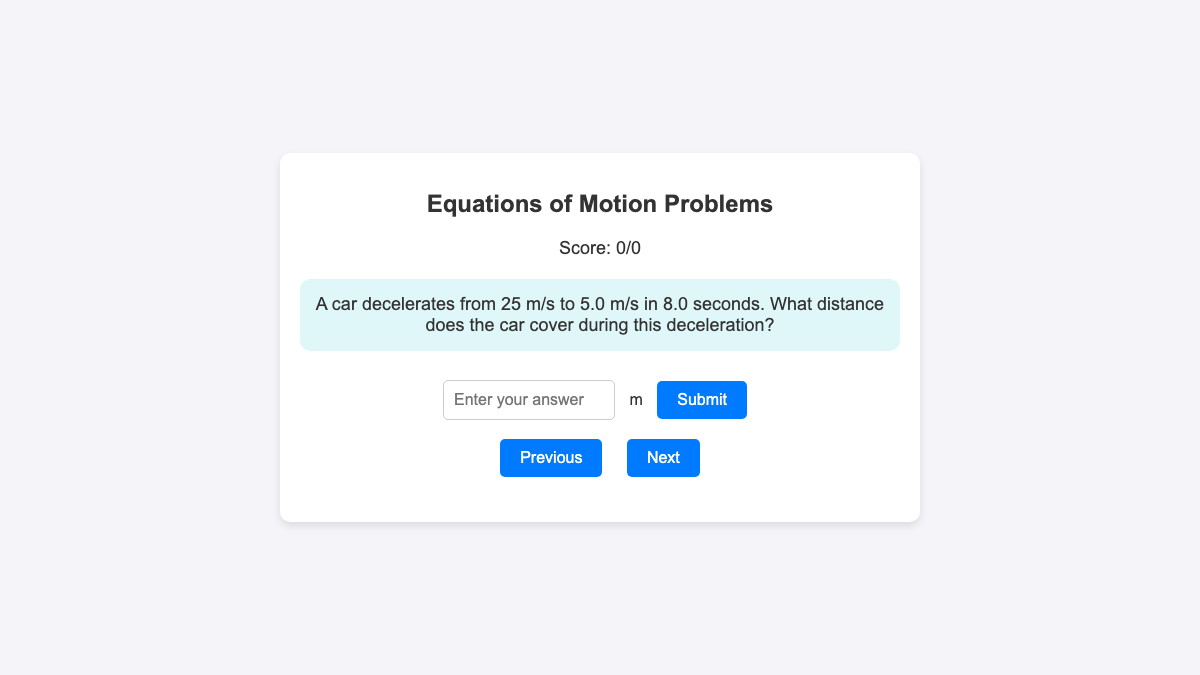
With a set of questions on the equations of rectilinear motion as an example, the following quiz was generated using javascript by ChatGPT. This type of quiz is not linked to a...
With a set of questions on the equations of rectilinear motion as an example, the following quiz was generated using javascript by ChatGPT. This type of quiz is not linked to a database unless such integration is done, so the scores are not stored. However, they make for good self-assessment for students at the end of each topic.
The quizzes are easily generated using a set of prompts that are shown below, and hosted on any static page such as github pages or uploaded as a zip file into the Student Learning Space.
The URL for this sample quiz is at https://physicstjc.github.io/sls/kinematics-quiz/. In fact, this quiz can be used as a template for quantitative quizzes for other topics as well. All the user has to do is to edit the five fields in each question: the question, correct answer, unit, equation and explanation within the index.html file (right-click to save and edit with plain text editor).
The format of the questions is written in this way:
const problems = [
      {
        question: "A car starts from rest and accelerates uniformly at 2.0 m/s² for 10 seconds. What is the final velocity of the car?",
        correctAnswer: 20,
        unit: "m/s",
        equation: "v = u + at",
        explanation: "Using v = u + at, where u = 0 (starts from rest), a = 2.0 m/s², and t = 10 s, we get v = 0 + 2.0*10 = 20 m/s."
      },
      {
        question: "A car traveling at 15 m/s accelerates uniformly at 3.0 m/s² for 5.0 seconds. What is the final velocity of the car?",
        correctAnswer: 30,
        unit: "m/s",
        equation: "v = u + at",
        explanation: "Using v = u + at, where u = 15 m/s, a = 3.0 m/s², and t = 5.0 s, we get v = 15 + 3.0*5.0 = 30 m/s."
      }]
The initial prompts given to ChatGPT were:
- Create a javascript app to explain problems involving equations of motion, v = u + at, v^2 = u^2 + 2as, s = (u + v)*t /2 and s = ut + 0.5 at^2.
- Give a word problem based on any one of these equations.
- Use an input box for the user to key in their answer.
- Indicate the required unit next to the input box.
- If the answer is wrong, explain to the user why it is wrong.
- If the user is correct, add 1 to the score and proceed to another problem.
- Indicate the scores over the total number of questions attempted.
The follow-up or refinement prompts were:
- Add 10 different problems to the list.
- Use "Previous" and "Next" buttons to navigate.
- When the user returns to a question that was attempted previously, he should not be able to attempt that question again.
- Add some css styling to make it appealing.
- Randomise the appearance of the questions and do not repeat questions.
- Represent the values in 2 significant figures.
The workflow for converting the generated codes to a web app can be found here.